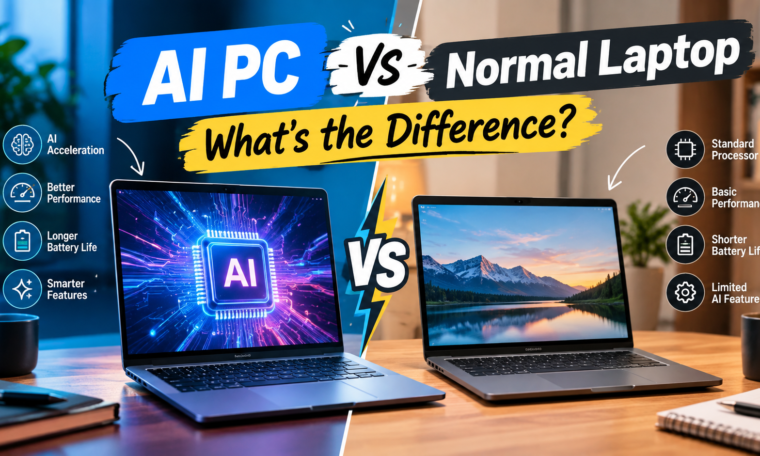
The difference between an AI PC and a normal laptop has become an important topic for people shopping for a new computer in 2026. Traditional laptops already handle everyday tasks such as browsing, office work, entertainment, coding, video calls, and light editing. AI PCs add dedicated hardware designed to accelerate certain artificial intelligence workloads directly on the device.
The biggest difference is usually the presence of a Neural Processing Unit (NPU). Unlike a CPU, which handles general computing tasks, an NPU is designed specifically for certain AI operations. Microsoft’s Copilot+ PC requirements, for example, include an NPU capable of more than 40 trillion operations per second, along with at least 16GB RAM and a 256GB SSD.
But does that mean an AI PC is automatically better than a normal laptop? Not necessarily. The right choice depends on how you use your computer, the applications you run, your budget, and whether you actually need local AI features.
What Is an AI PC?
An AI PC is a computer equipped with hardware designed to handle artificial intelligence workloads more efficiently.
The most important component is the NPU, or Neural Processing Unit. It works alongside the CPU and GPU instead of replacing them.
For example, the CPU may handle general applications, the GPU may handle graphics and demanding visual workloads, while the NPU can accelerate compatible AI tasks.
Modern AI PCs can support features such as background blur, voice enhancement, real-time translation, image-related AI functions, and other AI-assisted experiences.
Microsoft describes Copilot+ PCs as a class of Windows 11 computers with dedicated AI hardware, including NPUs capable of at least 40 TOPS.
What Is a Normal Laptop?
A normal laptop is designed primarily around conventional computing hardware.
It can use a CPU, GPU, RAM, and storage to perform everyday tasks. Depending on the model, it can also handle demanding activities such as gaming, programming, photo editing, and video production.
A traditional laptop can still run AI applications. However, many AI workloads may rely more heavily on the CPU, GPU, or cloud services if dedicated AI acceleration is unavailable.
Therefore, an ordinary laptop is not an “AI-free” computer. The major difference is the hardware and software optimization available for specific AI workloads.
AI PC vs Normal Laptop: Key Differences
| Feature | AI PC | Normal Laptop |
|---|---|---|
| Dedicated NPU | Usually available | Usually absent |
| AI processing | More local acceleration | Often CPU/GPU or cloud-based |
| AI features | More integrated features | Depends on software |
| Battery efficiency for AI tasks | Can be improved for supported workloads | Depends on CPU/GPU |
| General performance | Varies by processor | Varies by processor |
| Gaming | Depends mainly on GPU | Depends mainly on GPU |
| Price | Often higher | Wider range |
| Future AI features | Designed with AI workloads in mind | Depends on hardware |
The table shows why the “AI” label alone should not determine your purchase.
What Does an NPU Actually Do?
The NPU is one of the biggest changes introduced by the latest generation of PCs.
Imagine your computer as a team. The CPU is the general-purpose worker, the GPU specializes in graphics and parallel workloads, and the NPU specializes in certain AI calculations.
An NPU can perform supported AI operations efficiently without placing the entire workload on the CPU.
This can be useful for features such as:
- Background effects during video calls
- Voice enhancement
- Live captions and translation
- AI image processing
- Some generative AI features
- Intelligent search
- Certain productivity tools
Microsoft says Copilot+ PCs use their NPU for AI experiences that can run locally on the device.
Is an AI PC Faster Than a Normal Laptop?
This is where buyers should be careful.
An AI PC is not automatically faster at everything.
If you’re opening Chrome, writing documents, watching Netflix, or using a conventional application, an AI PC may not provide a dramatic advantage simply because it has an NPU.
The NPU becomes more relevant when you use software that has been optimized to take advantage of it.
For gaming, the GPU remains extremely important. For coding, CPU performance, RAM, storage, and software compatibility may matter more.
So instead of asking, “Is an AI PC faster?”, ask, “Which workloads can actually use its AI hardware?”
AI PC and Battery Life
Battery efficiency is another reason manufacturers are adding NPUs.
AI tasks that run on a dedicated low-power accelerator can potentially reduce the amount of work handled by other processors.
However, battery life depends on many factors, including:
- Processor design
- Display brightness
- Screen resolution
- Battery capacity
- Application usage
- Network activity
- Background processes
- Power-management settings
Therefore, don’t assume every AI PC automatically provides longer battery life.
AI PCs and Privacy
One potential advantage of local AI processing is that some tasks can happen directly on your computer instead of requiring a cloud service.
That can be useful when dealing with sensitive information.
Microsoft says Copilot+ PCs are designed to support secure, on-device AI processing for compatible experiences.
However, not every AI feature runs locally. Some applications still depend on internet-connected cloud services.
Always check how a particular application processes your data before using it for sensitive work.
AI PC vs Normal Laptop for Students
Students can choose either type depending on their needs.
If your work involves browsing, presentations, programming, PDFs, online classes, and basic productivity, a good conventional laptop can be sufficient.
An AI PC becomes more interesting if you regularly use AI-powered productivity tools, video conferencing features, image creation, transcription, or other compatible applications.
For students, RAM and storage should remain important priorities. A laptop with a strong processor, 16GB RAM, and sufficient SSD storage can be more useful than buying an expensive AI PC simply because of its marketing label.
AI PC vs Normal Laptop for Creators
Content creators may benefit more from AI hardware, but the benefit depends on the software.
Video editing applications increasingly use AI for tasks such as background removal, transcription, audio enhancement, color correction, and content organization.
Still, creators should prioritize the complete hardware package.
Look at:
- CPU performance
- GPU
- RAM
- SSD
- Display quality
- Color accuracy
- Cooling
- Battery life
- NPU capabilities
For demanding video editing, a powerful GPU can remain more important than an NPU.
AI PC vs Normal Laptop for Gaming
Gamers should not buy an AI PC solely because it has an NPU.
Gaming performance depends heavily on the GPU, CPU, cooling system, display refresh rate, and game optimization.
AI hardware can still have supporting roles in some modern gaming technologies, but the presence of an NPU does not automatically mean higher gaming performance.
If gaming is your main purpose, compare GPU specifications first.
Are AI PCs More Expensive?
AI PCs can cost more than entry-level conventional laptops because they often use newer processors and additional AI-focused hardware.
However, the price gap varies considerably.
You can now find AI-focused laptops across different categories, from thin-and-light machines to premium business and creator systems.
Before spending extra, consider whether you will actually use the AI features.
Should You Buy an AI PC in 2026?
An AI PC can make sense if you want a modern laptop designed around emerging AI workloads.
It can be particularly interesting for:
- Students using AI productivity tools
- Business users
- Content creators
- Frequent video-call users
- Professionals interested in local AI
- Users planning to keep a laptop for several years
A conventional laptop can still be the sensible choice if your requirements are basic and you want to maximize value.
Final Thoughts
The AI PC vs normal laptop debate is not simply about which technology is newer. AI PCs add dedicated hardware, particularly NPUs, that can accelerate supported artificial intelligence workloads. Microsoft’s Copilot+ category requires specific AI hardware and system specifications, showing how AI is becoming part of the PC hardware ecosystem.
However, an NPU does not replace the CPU or GPU. If you primarily browse the web, study, work with documents, watch videos, or run conventional applications, a well-equipped normal laptop may still meet your needs.
Before buying an AI PC, look at the complete specification sheet rather than the AI branding alone. Consider the processor, RAM, storage, GPU, display, battery, ports, software compatibility, and the AI features you actually plan to use.