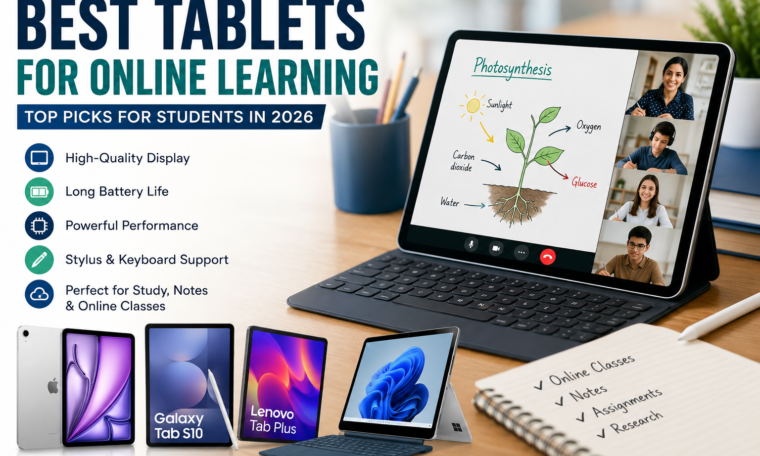
Best Tablets for Online Learning, Online learning has become an essential part of education, whether you’re attending virtual classes, taking certification courses, or preparing for competitive exams. A reliable tablet offers the perfect balance between portability, performance, and affordability, making it an excellent alternative to a traditional laptop for many students.
The best tablets for online learning combine a high-quality display, long battery life, fast processors, and support for note-taking accessories such as styluses and keyboards. Whether you’re attending virtual classes or completing assignments, choosing the best tablet for students depends on your budget, educational needs, preferred operating system, and the features that best support your learning experience.
According to UNESCO, digital technologies should support inclusive, accessible, and learner-centered education, making well-designed digital devices an important component of modern learning environments.
Why Choose a Tablet for Online Learning?
Tablets have evolved significantly over the past few years. Modern models are powerful enough to handle:
- Live video classes
- Digital note-taking
- Reading eBooks and PDFs
- Research and web browsing
- Educational apps
- Assignment creation
- Cloud collaboration
- Video streaming for recorded lectures
Unlike bulky laptops, tablets are lightweight and easy to carry, making them ideal for students who frequently travel between home, school, and libraries.
Features to Look for in the Best Tablets for Online Learning
Best Tablets for Online Learning, Before purchasing a tablet, consider these important specifications.
1. Display Quality
A large Full HD or higher-resolution display reduces eye strain during long study sessions.
Recommended sizes include:
- 10–11 inches for portability
- 12–13 inches for multitasking
2. Battery Life
Students often spend several hours attending lectures and completing assignments.
Look for:
- Minimum 10 hours of battery life
- Fast charging support
3. Processor Performance
A fast processor ensures smooth multitasking when running video conferencing apps alongside note-taking software.
Suitable processors include:
- Apple A16 and M-series chips
- Qualcomm Snapdragon processors
- MediaTek Dimensity processors
- Samsung Exynos chips
4. Stylus Support
Writing equations, solving math problems, drawing diagrams, and annotating lecture slides becomes much easier with a digital pen.
Popular styluses include:
- Apple Pencil
- Samsung S Pen
- Lenovo Precision Pen
5. Keyboard Compatibility
Students writing essays or research papers should choose tablets that support detachable keyboards.
A keyboard significantly improves productivity for:
- Typing assignments
- Creating presentations
- Writing reports
- Coding practice
6. Storage Capacity
Educational resources quickly consume storage.
Recommended:
- 128GB minimum
- Expandable storage if available
- Cloud storage integration
Best Tablets for Online Learning
1. Apple iPad (11th Generation)
Best Overall
Pros
- Excellent performance
- Outstanding app ecosystem
- Long software support
- Great battery life
- Apple Pencil compatibility
Ideal For
- College students
- Medical students
- Engineering students
- Online certification courses
The standard iPad delivers exceptional value while offering smooth performance for video classes, multitasking, digital textbooks, and creative projects.
2. Apple iPad Air
Best Premium Tablet
The iPad Air features Apple’s M-series processor, making it powerful enough for demanding academic workloads.
Perfect for:
- Graphic design students
- Architecture students
- Video editing
- Digital illustration
- Professional online courses
Its lightweight design makes it easy to carry throughout the day.
3. Samsung Galaxy Tab S10 Series
Best Android Tablet
Samsung’s flagship tablets provide:
- AMOLED display
- S Pen included
- Excellent multitasking
- Split-screen productivity
- Samsung DeX desktop mode
Students can comfortably attend Zoom classes while taking handwritten notes simultaneously.
4. Lenovo Tab Plus
Best Budget Tablet
Lenovo offers affordable tablets suitable for:
- School students
- Online coaching
- Reading study material
- Watching educational videos
It provides good battery life and dependable performance without stretching your budget.
5. Microsoft Surface Pro
Best Tablet-Laptop Replacement
Although more expensive, the Surface Pro runs full Windows applications.
Ideal for:
- Programming
- Engineering software
- Microsoft Office
- Research work
- Business students
It functions as both a laptop and a tablet.
Android vs iPad: Which is Better?
Choose an iPad if you want:
- Longer software updates
- Better educational apps
- Superior performance
- Excellent stylus experience
- Strong resale value
Choose Android if you prefer:
- Lower prices
- Expandable storage
- Greater hardware variety
- Better customization
- USB-C flexibility
Both ecosystems are excellent for online learning, and the best choice depends on your budget and personal preferences.
Best Apps for Online Learning
Best Tablets for Online Learning, Regardless of your tablet choice, these educational apps can enhance productivity:
- Google Classroom
- Microsoft Teams
- Zoom
- Google Meet
- Notion
- OneNote
- Evernote
- Khan Academy
- Coursera
- Udemy
- Canva
- Adobe Acrobat Reader
Most of these apps work seamlessly across Android and iPadOS.
Accessories Worth Buying
A few accessories can significantly improve your learning experience.
Stylus
Perfect for:
- Handwritten notes
- Solving equations
- Drawing diagrams
- Annotating PDFs
Bluetooth Keyboard
Makes typing much faster for assignments and reports.
Protective Case
Protects the tablet during travel.
Screen Protector
Reduces scratches and helps preserve display quality.
Wireless Earbuds
Useful for attending lectures in noisy environments.
Benefits of Using Tablets for Online Learning
Best Tablets for Online Learning, Students increasingly prefer tablets because they offer several advantages:
- Lightweight and portable
- Faster startup than most laptops
- Long battery life
- Easy digital note-taking
- Instant access to educational apps
- Better reading experience
- Improved organization of study materials
- Excellent video conferencing quality
With cloud storage, students can access assignments from virtually anywhere.
Tips for Choosing the Right Tablet
Before purchasing, ask yourself:
- What is your budget?
- Will you use a stylus?
- Do you need a keyboard?
- Is portability important?
- Will you edit videos or only attend classes?
- Do you require desktop software?
- How much storage will you need?
Selecting a tablet based on your academic requirements helps ensure you get the best value for your investment.
Read More: GTA 6 Physical Release: Why It May Not Launch on Day One
Final Thoughts
The best tablets for online learning combine performance, portability, and productivity in one compact device. Whether you’re a school student, university learner, or professional taking online courses, a quality tablet can make studying more efficient and enjoyable.
For most users, the Apple iPad (11th Generation) offers the best overall balance of performance, battery life, and educational apps. Students looking for an Android alternative will find the Samsung Galaxy Tab S10 Series an outstanding option, while budget-conscious buyers can consider Lenovo’s affordable tablets.
As digital education continues to expand, investing in a capable tablet can improve collaboration, organization, and access to learning resources. International organizations such as UNESCO also emphasize that effective digital learning should be accessible, inclusive, and supported by appropriate technology.